


Color Master - Color by Number
4.74.49K Reviews
App Specs
- Version
- 2.17.17
- Updated On
- License
- Free
- Downloads
- 5,000,000+
- Developer
- Coloring Game Studio@RabiGame
- Categories
- Board
- Platform
- Android
Screenshots




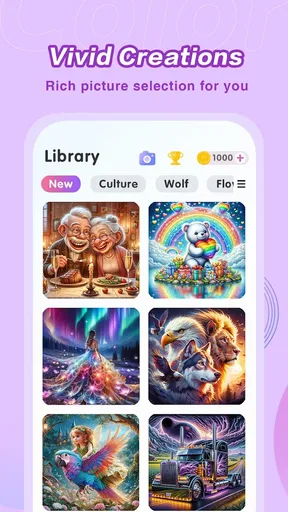
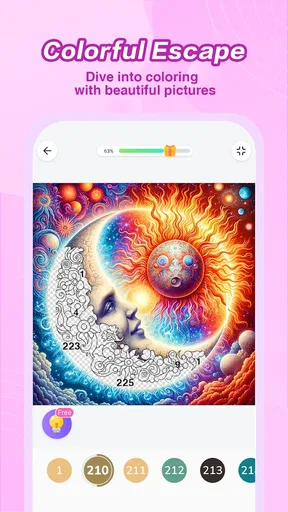
 Analysis by AppCompare
Hey there! So, I just spent some time diving into Color Master - Color by Number, and let me tell you, it's like a little oasis of relaxation on my phone. If you're into coloring and need a chill way to pass the time, this app might just be your new best friend. Let’s break it down.
Choosing a coloring game that fits your routine
Before settling on a coloring app, I ask myself what I actually want from it: a quick, low-pressure break, a more demanding creative project, or a place to browse and share finished work. Color Master is built around numbered coloring, so it suits the first kind of session particularly well. It gives me a clear next action instead of asking me to choose every color or invent a composition from scratch.
That distinction matters if you’re deciding between a color-by-number game and a freeform drawing app. Freeform tools give you more control over brushwork, color mixing, and personal interpretation, but they also ask more of you. Here, the number-and-color structure narrows the choices and lets me concentrate on filling the picture. I find that relaxing when I’m tired, though it is not the right fit if I want to sketch something original.
The game is free to download, and it is rated for Everyone, which makes it approachable for casual use across age groups. In-app purchases range from $0.49 to $69.99 per item, so I would treat the free experience as the sensible place to start and check purchase details before spending. If your priority is an entirely open-ended art tool or a purchase with one clear, fixed cost, that difference may affect your choice.
First Impressions
When I first opened Color Master - Color by Number, I was greeted by a clean and vibrant interface. It’s super intuitive, which means you can jump right into the fun without a steep learning curve. The app is filled with a broad array of categories, so whether you're into animals, mandalas, or landscapes, there's something that’ll catch your eye.
Getting Started
Coloring by number is as easy as pie. You select an image, and the app provides you with a palette of colors paired with numbers. Simply tap on a number, and color away. It’s a fantastic way to unwind and let your mind wander a bit. Plus, the app does a great job of zooming in on intricate details, so you don't miss a beat.
One of the things I love is the accessibility. You don't need to be a seasoned artist to create something beautiful. It’s like painting with training wheels, and the end result is always pleasing to the eye.
Worth Reading Before You Choose

EA SPORTS FC Mobile 26 Is a Bigger Football Game, but It Takes Time

Flipboard Shows What News Apps Must Do Beyond the Feed

Switching to Android Auto Means Rethinking Your Driving Routine

Google Calendar Makes a Crowded Week Easier to Manage

Ludo King Makes the Most of the Minutes Between Plans

Baby Panda World Brings Quick Play to Modern Phones, but Its Game Library Feels Busy
Making short sessions work
The numbered approach is especially handy when I have only a few minutes. I can open an image, focus on one color, and stop when I need to get back to something else. Rather than treating every picture as a project that must be completed in one sitting, I find it more comfortable to think of each color as a small task. That makes the game easier to fit into a commute break, a quiet moment at home, or the pause between daily errands.
For intricate pictures, I’d start by selecting a color with several visible areas rather than trying to chase the tiniest sections first. Zooming in helps with precision, but it can also make it harder to keep track of the overall composition. Switching back out occasionally gives me a better sense of progress and helps prevent the picture from feeling like a collection of isolated patches.
That rhythm is a useful trade-off: the app removes the pressure of choosing colors, but it still asks for patience when a design has many small spaces. If I want a fast result, I choose an image that looks manageable at a glance. If I’m in the mood to settle in longer, the finer details give me something steady to work through.
Features that Stand Out
There are a few features that really make this app shine. For one, they’ve got a daily image feature. Every day, there’s a fresh image to color, which keeps things exciting and ensures you never run out of new content.
The app also offers a community aspect. Once you complete a masterpiece, you can share it in the app’s gallery. It’s a neat way to see what others are creating and maybe even gather a little inspiration for your next project.
Another highlight is the color hints. If you're ever stuck or can't find a particular spot, the app provides hints to guide you. It’s like having a little helper that ensures you never get frustrated.
Where it stands out among alternatives
The scale of the image collection is a strong reason to try it if browsing for something to color is part of the fun. The game’s store summary points to more than 20,000 artworks, and the developer is Coloring Game Studio@RabiGame. I see that breadth as a practical advantage over a coloring app with a smaller, fixed selection: you can browse for a picture that suits your mood rather than repeatedly returning to the same few choices.
There is also a useful difference between this kind of game and a traditional paper coloring book. Paper offers a tactile experience and no screen, while this app gives me a guided palette, zooming for small areas, and a daily image to return to. Neither approach is universally better. I’d choose paper when I want to step away from my phone completely, and this game when I want something portable and easy to pick up without preparing materials.
Compared with other color-by-number games, I would weigh the variety and the extra features against the way access to some designs is handled. If discovering a large catalog and having optional hints matter to you, those are meaningful reasons to give this one a look. If you mainly want unrestricted drawing, social sharing, or a very simple set of pictures without purchase prompts, a different kind of app may suit you better.
Time to Relax
Now, let’s talk about the relaxation factor. The app comes with soothing background music, which is an absolute delight. It creates this lovely atmosphere that makes coloring feel like a mini retreat from daily stresses. And if music isn’t your thing, muting it is just a tap away.
Personally, I found myself reaching for Color Master whenever I needed a break. It’s perfect for those moments when you have a few minutes to spare and want to do something that’s both enjoyable and calming.
A realistic everyday use
Imagine having a short wait before an appointment or winding down after a busy day. I’d open the game, choose an image that doesn’t look too dense, and fill a handful of sections while listening to the music—or with the sound muted if I’m somewhere quiet. If a patch is difficult to locate, a hint can keep me moving instead of turning the break into a frustrating search. That’s a better use for the app than expecting it to replace a serious art session.
For a shared household device, the account option deserves a little thought: the store summary mentions syncing across devices, which is useful if you move between devices and want continuity. I would use that when I expect to switch screens, but I’d still make sure I’m using the same account and understand the app’s sync prompts before relying on it. It is a convenience, not a reason to assume every detail of progress will behave exactly as I expect.
Room for Improvement?
While the app is mostly a hit, there are a couple of areas that could use a bit of polish. For instance, some of the more complex images can feel a tad overwhelming because of the tiny sections that need coloring. A few more zooming options or a slightly larger interface could enhance the experience significantly.
Also, while there are plenty of free images, some of the more intricate designs are locked behind a paywall. Subscriptions or in-app purchases are common in these types of apps, but it might be nice to see an option for users who prefer a one-time purchase to unlock everything.
What to consider before spending or switching
I would browse and try the free pictures first, then decide whether the available paid designs are worth the cost to me. The listed purchase range is broad, so it is worth checking the price attached to a specific item rather than assuming every unlock costs the same. I would also avoid buying simply because a detailed image looks tempting: first consider whether I enjoy the slower, more precise coloring it requires.
If you already use another coloring app, switching is easy in one sense and costly in another. The basic activity is familiar, so there is little new to learn; the real trade-off is leaving behind a collection or routine you already like. I’d try this game alongside your current choice for a few sessions, compare the image selection and how often you reach for hints, then decide whether its catalog and daily picture make it a better fit.
The game has an average rating of 4.7 from around 47,000 ratings, with roughly 4,300 written reviews and over 5 million installs. Those figures suggest it has found a substantial audience, but they don’t tell me whether the pacing or purchase model will suit you personally. It runs on Android 6.0 or later, and version 2.17.0 is the current version. For me, the most useful test is still whether I enjoy the first few coloring sessions without feeling rushed to buy extra content.
Final Thoughts
Overall, Color Master - Color by Number is a delightful app for anyone looking to unwind with a creative outlet. It’s user-friendly, packed with various images, and offers a relaxing environment that makes it easy to lose track of time. Whether you’re a coloring enthusiast or just someone looking to try something new, this app is worth checking out. You might find yourself getting hooked on this colorful escape!
My recommendation is strongest for people who enjoy gentle, guided activities and like having a broad selection to browse. I’d be less likely to suggest it to someone who wants to make their own art, dislikes tapping through small sections, or prefers to avoid in-app purchases altogether. If you’re unsure, start with a free image, try a short session with the sound on and another with it muted, and notice whether the numbered process actually helps you relax. If it does, this is an easy game to keep nearby for a small, satisfying break.
Pros
- Intuitive interface
- easy to navigate.
- Vast library of coloring pages.
- Regular updates with new designs.
- Offline mode available for convenience.
- Soothing background music enhances focus.
Cons
- Too many ads can interrupt the experience.
- Limited free options without subscription.
- Some designs are overly simplistic.
- Requires large storage space.
- No option for custom color palettes.
FAQs for Color Master - Color by Number
What is Color Master - Color by Number?
Color Master - Color by Number is a mobile app designed for both Android and iOS platforms that offers a relaxing and creative experience through digital coloring. Users can enjoy painting intricate designs by following a simple number guide, making it accessible for all ages and skill levels. The app features a wide variety of artwork, from simple to complex, catering to different preferences.
How does the color-by-number system work in this app?
The color-by-number system in Color Master is straightforward and intuitive. Each image is divided into numerous sections, each marked with a specific number. These numbers correspond to a color palette provided within the app. Users simply select a number and the corresponding color to fill in the sections, gradually completing the image with ease. This method ensures that even beginners can create beautiful artwork.
Are there any subscription fees or in-app purchases?
Color Master - Color by Number offers both free and premium content. While the app is free to download, it includes in-app purchases and subscription options for users who wish to access premium features. These may include an ad-free experience, exclusive artwork, or additional color palettes. It's essential to review these options before purchasing to ensure they align with your needs.
Is Color Master suitable for children?
Yes, Color Master is suitable for children, offering a family-friendly interface and content. The app's simplicity makes it easy for kids to use, promoting creativity and fine motor skills development. However, parental supervision is recommended, especially since the app includes in-app purchases and advertisements that children might inadvertently interact with.
Can I use Color Master offline?
Color Master allows users to download artwork for offline use, enabling them to enjoy the app without an internet connection. However, some features, such as accessing new images or updates, might require an internet connection. It's a great option for those who want to use the app during travel or in areas with limited connectivity.


